
GeM Portal Registration Process: A Step-by-Step Guide for Sellers and Service Providers
Table of contents
Introduction
The Government e-Marketplace (GeM) is an online procurement platform launched by the Government of India to facilitate the purchase of goods and services by government departments, ministries, public sector undertakings (PSUs), and other authorised organisations.
GeM provides an opportunity for manufacturers, suppliers, contractors, and service providers to offer their products and services to government buyers through a transparent online platform.
To participate in government procurement through GeM, businesses must first register as a Seller or Service Provider. Registration is free and can be completed online through the official portal.
This article explains the eligibility requirements, documents needed, and step-by-step procedure for registering on the GeM Portal.
Watch: GeM Portal Registration Process
1. Why Register on the GeM Portal?
Registration on GeM offers several advantages:
- Government business opportunities: Access procurement opportunities from government departments and public sector organisations.
- Wider market access: Offer products and services to buyers across India.
- Transparent procurement: Participate in electronic procurement and competitive bidding.
- MSME benefits: Eligible Micro and Small Enterprises may receive applicable procurement preferences and exemptions.
- Online transactions: Manage product listings, bids, orders, and related activities through one platform.
- Business growth: Develop a customer base in the government procurement market.
2. Who Can Register on GeM?
The following entities can generally register as sellers or service providers, subject to the applicable registration requirements:
- Proprietorship firms.
- Partnership firms.
- Limited Liability Partnerships (LLPs).
- Private and Public Limited Companies.
- Trusts and Societies.
- Other eligible organisations, including authorised government entities.
Both manufacturers and authorised resellers can register, subject to the relevant product-category requirements. Businesses providing professional, technical, manpower, maintenance, and other services can also register as service providers.
3. Documents and Information Required for Registration
Before starting registration, keep the following information ready:
| Particulars | Details required |
|---|---|
| Personal identification | Aadhaar/Virtual ID or Personal PAN of the authorised person |
| Mobile number | Aadhaar-linked mobile for Aadhaar verification, or mobile for PAN-based OTP verification |
| Email ID | Active personal or official email address |
| Business PAN | PAN of the proprietorship, firm, company, or other organisation, as applicable |
| Business details | Name, type, and date of incorporation or registration |
| CIN | Required for applicable companies |
| GST registration | GSTIN, wherever applicable |
| Bank details | Organisation’s bank account information |
| Income Tax Returns | Relevant ITR details, particularly for bid and reverse-auction participation |
| MSME details | Udyam registration, if claiming applicable MSE benefits |
Important: Aadhaar is not compulsory for seller registration; GeM also provides a personal PAN-based identity verification option. ITR details may be required for bid and reverse-auction participation, subject to applicable exemptions and the portal’s requirements.
4. Step-by-Step GeM Portal Registration Process
Step 1: Visit the Official GeM Website
Open the official website: https://gem.gov.in.
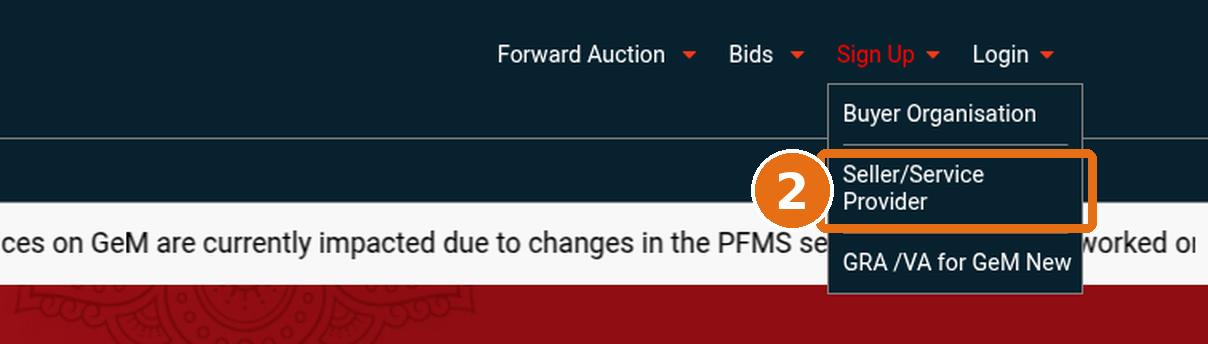
Click on Sign Up and select Seller/Service Provider from the available options.

Step 2: Select Business or Organisation Type
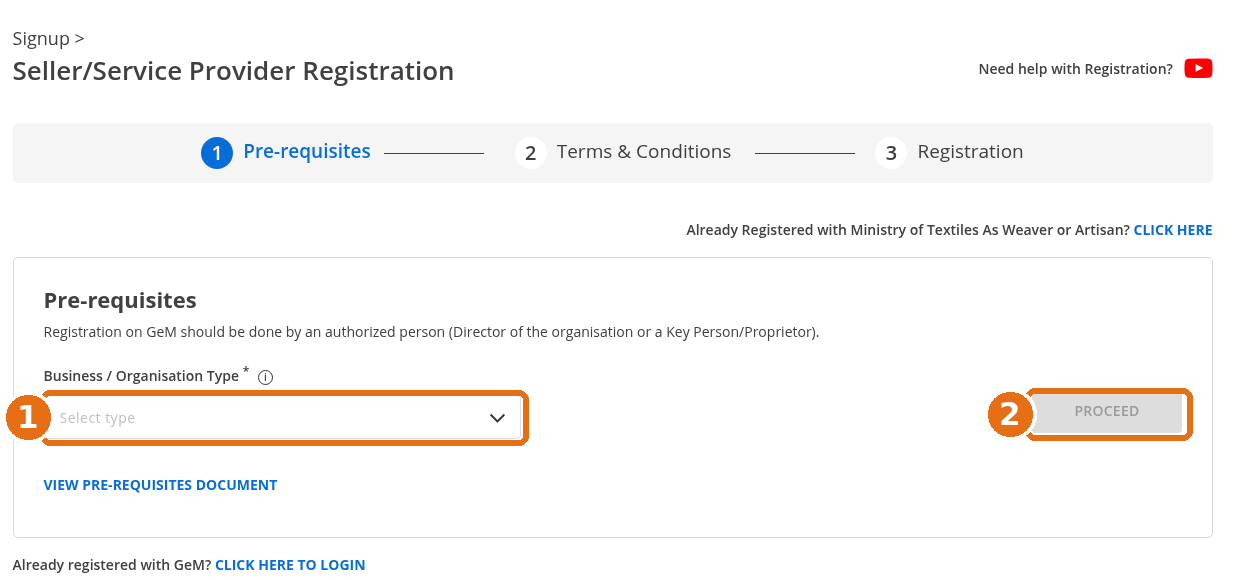
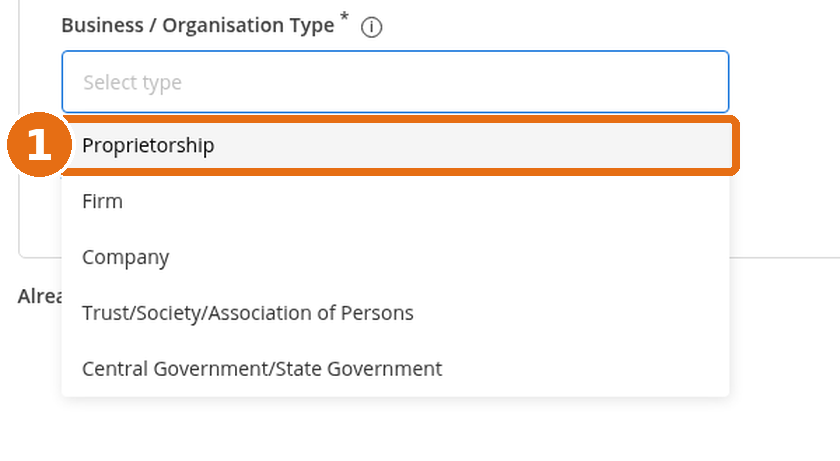
Select the appropriate organisation type from the dropdown menu, such as:
- Proprietorship
- Firm (Partnership/LLP)
- Company
- Trust/Society
- Government Entity
Read the registration prerequisites and terms and conditions before proceeding.
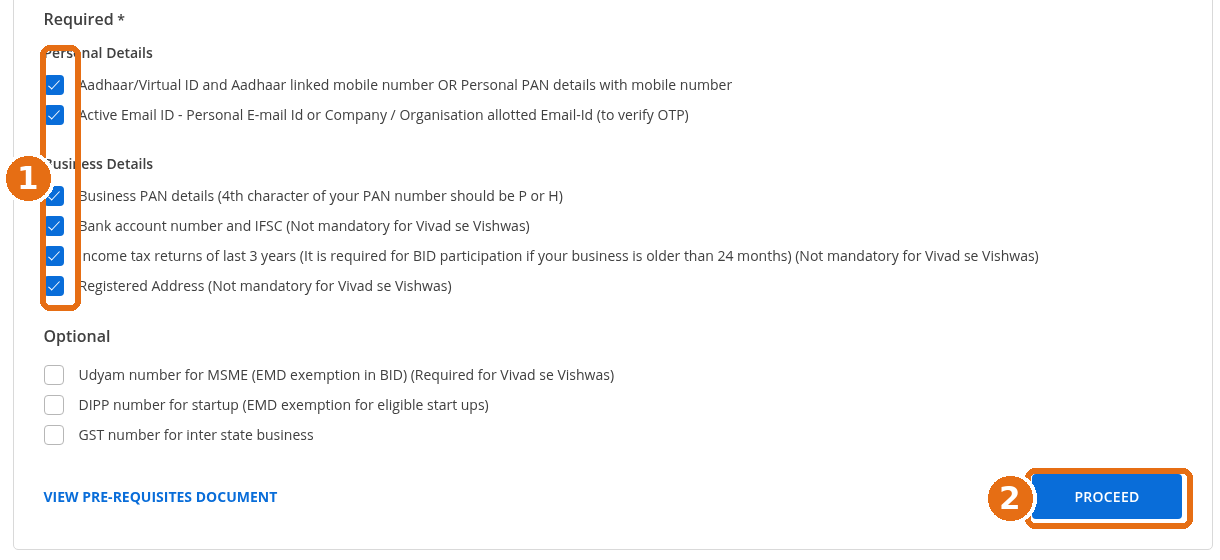
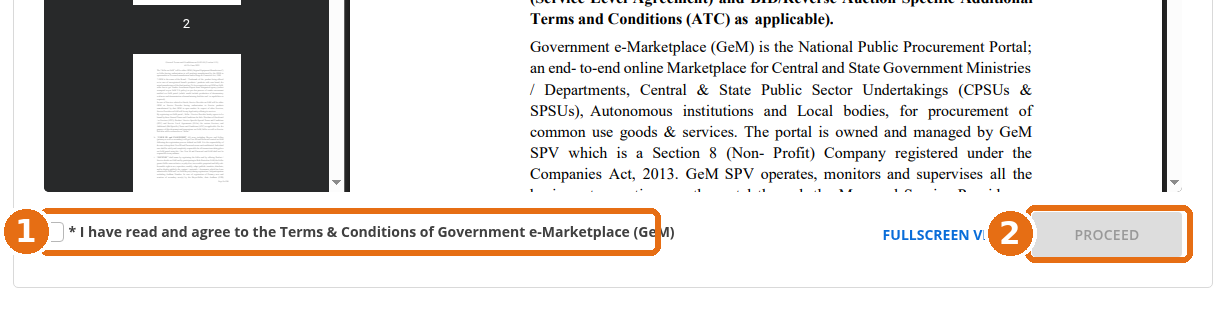
Step 3: Enter Organisation Details
Enter the registered name of your business or organisation exactly as recorded in the relevant government documents.
Confirm that the organisation details are correct before proceeding.

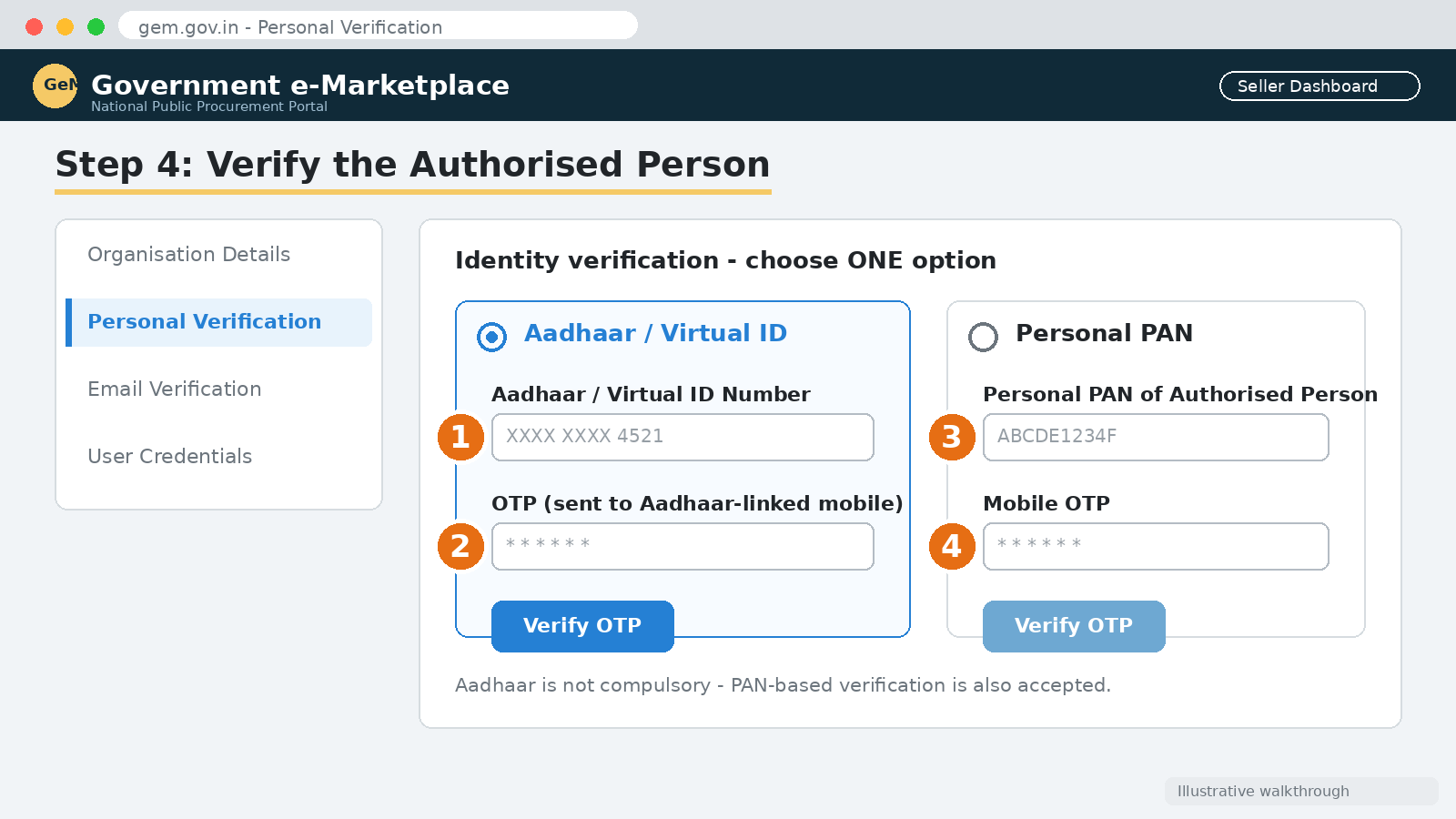
Step 4: Verify the Authorised Person
The person registering should be an authorised person or key person of the organisation.
Identity verification can generally be completed through either:
- Aadhaar: Enter Aadhaar or Virtual ID details and verify through the OTP sent to the linked mobile number.
- Personal PAN: Enter personal PAN details and complete the required mobile OTP verification.
Follow the verification instructions displayed on the portal.
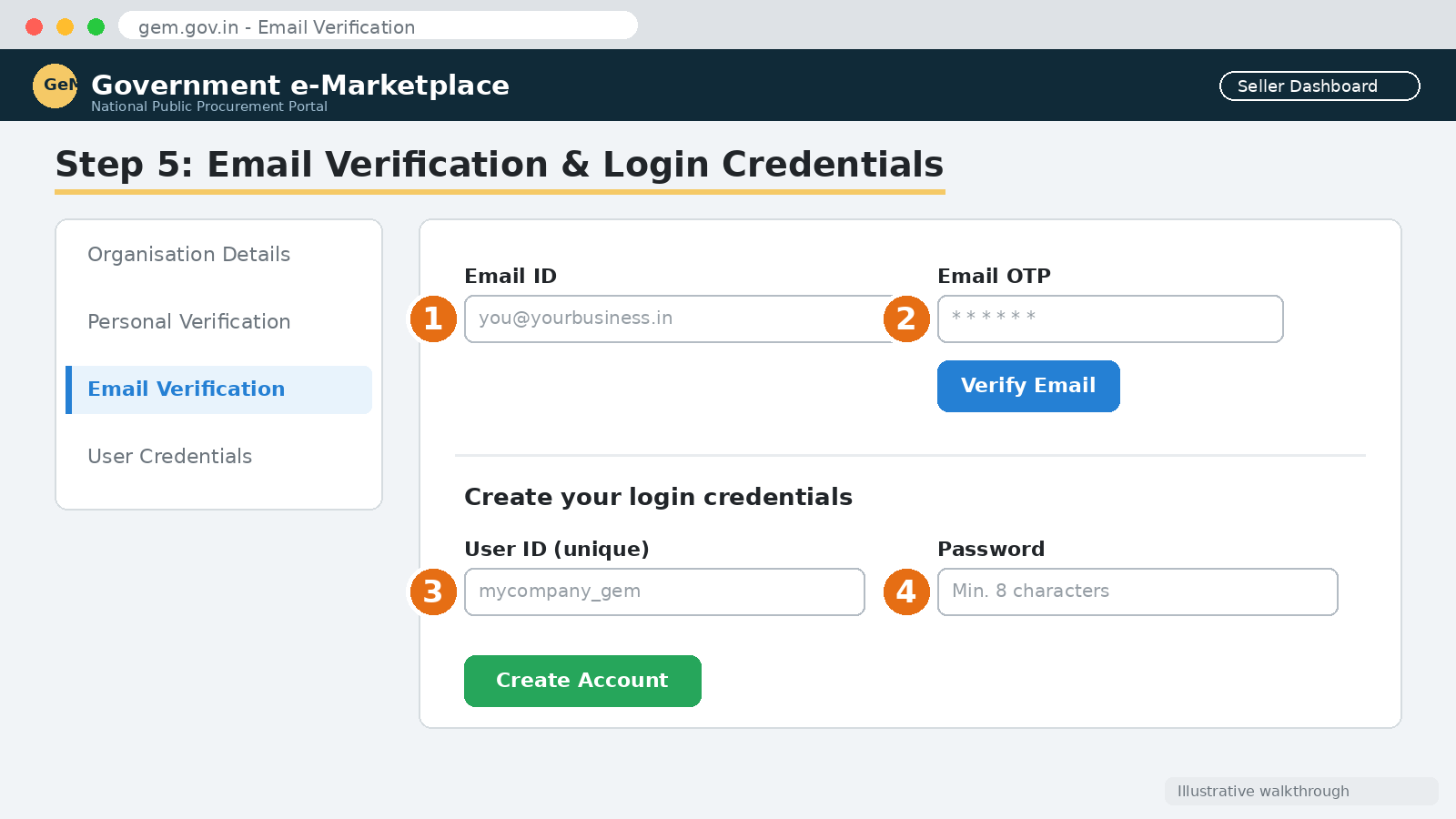
Step 5: Verify Email and Create Login Credentials
Enter an active email address and complete OTP verification.
Create a unique User ID and password for accessing the GeM seller account.
After successful registration, log in to the portal using the newly created credentials.
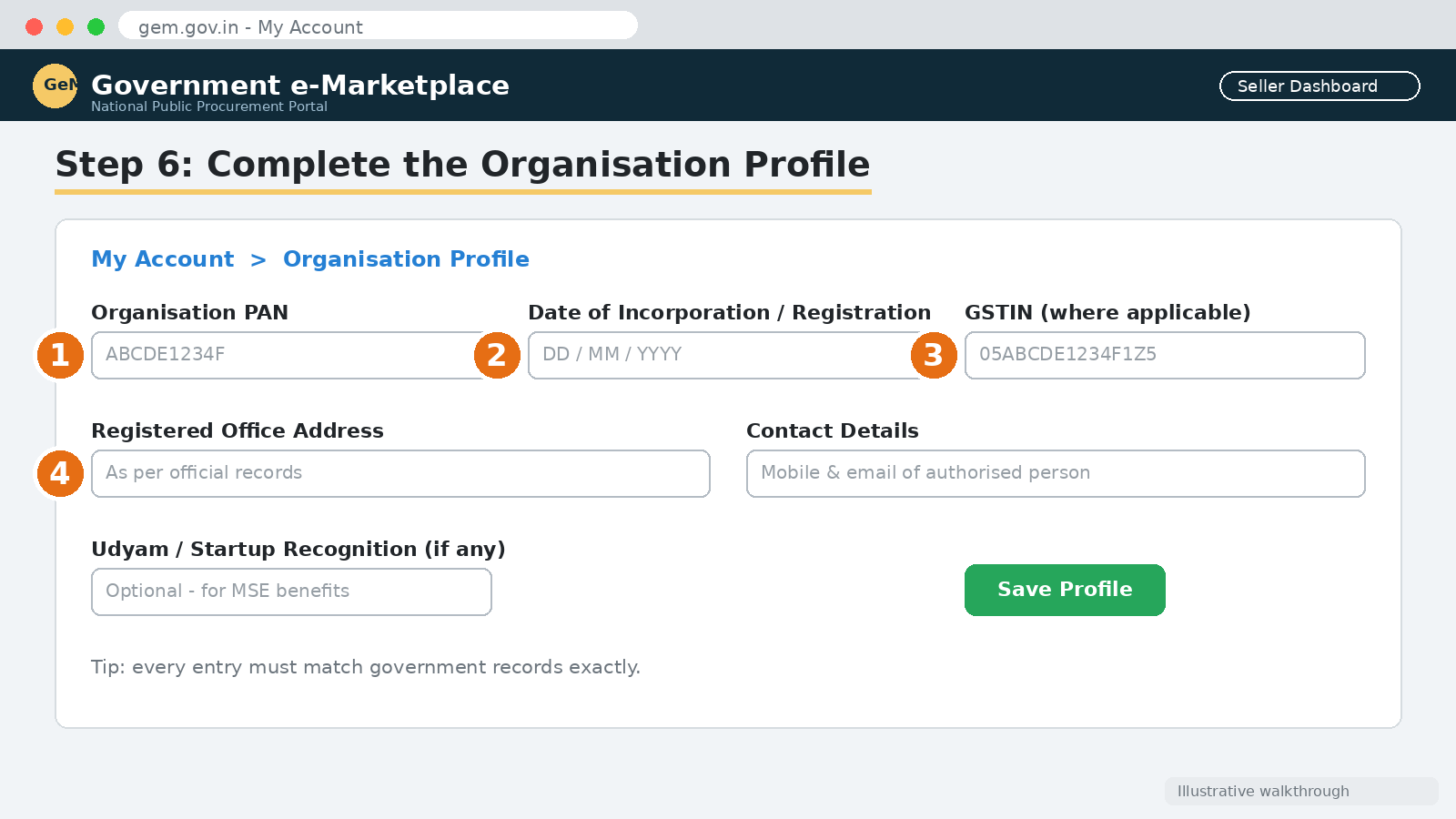
Step 6: Complete the Organisation Profile
After login, navigate to My Account or the relevant profile section and complete the organisation details.
The profile generally requires:
- Organisation PAN and business information.
- Date of incorporation or registration.
- Registered office address.
- GST details, wherever applicable.
- Contact details.
- Details of the authorised person.
- Bank account information.
- Income Tax Return details, where required.
- Udyam or start-up recognition details, if applicable.
Ensure that the information matches the records available with the relevant government authorities.
Step 7: Add and Verify Bank Account Details
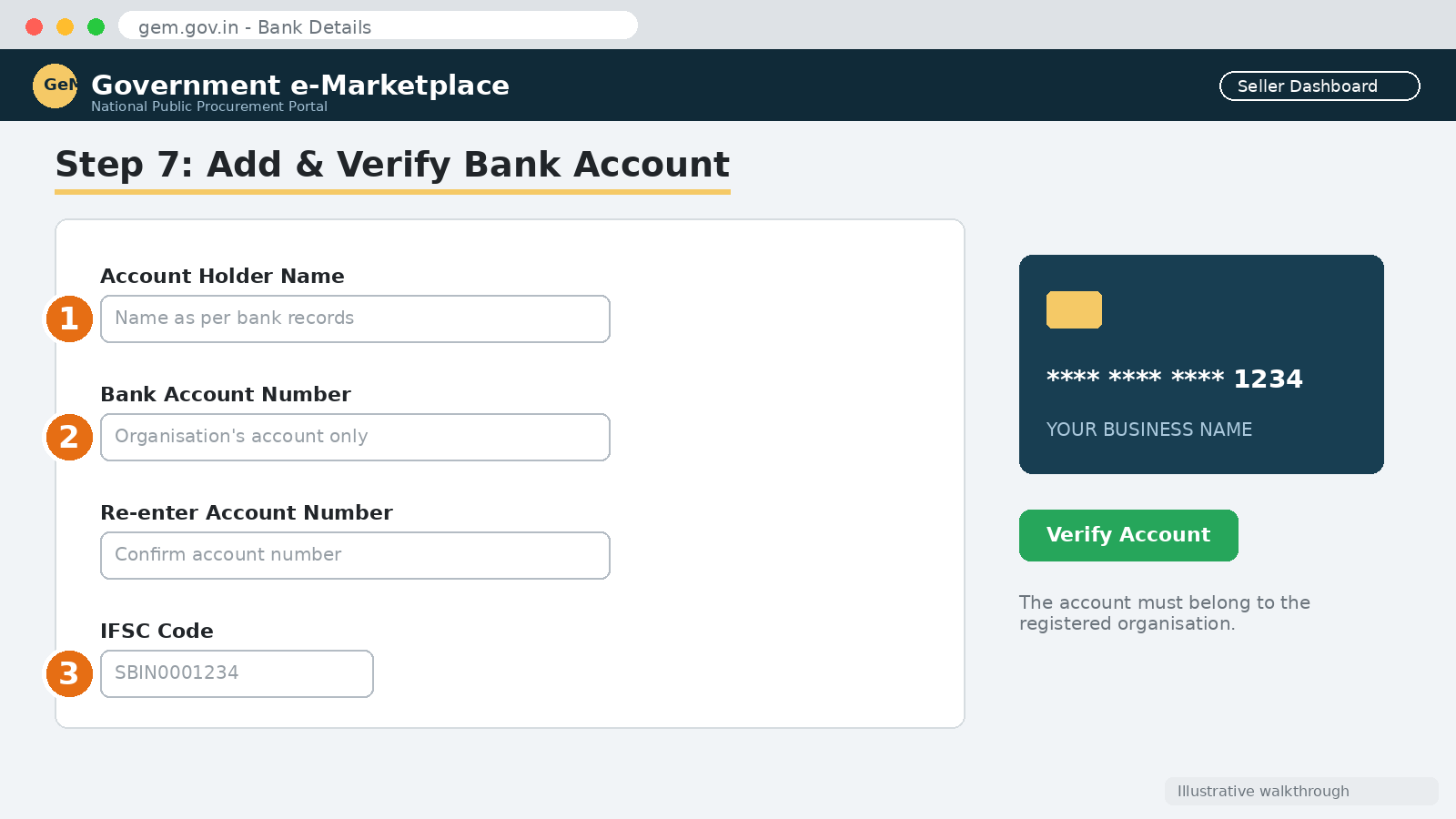
Enter the organisation’s bank account details, including account number, account holder name, and IFSC code.
The bank account should belong to the registered organisation, as required by the portal.
Complete the prescribed verification process.
Step 8: Complete Tax and Other Declarations
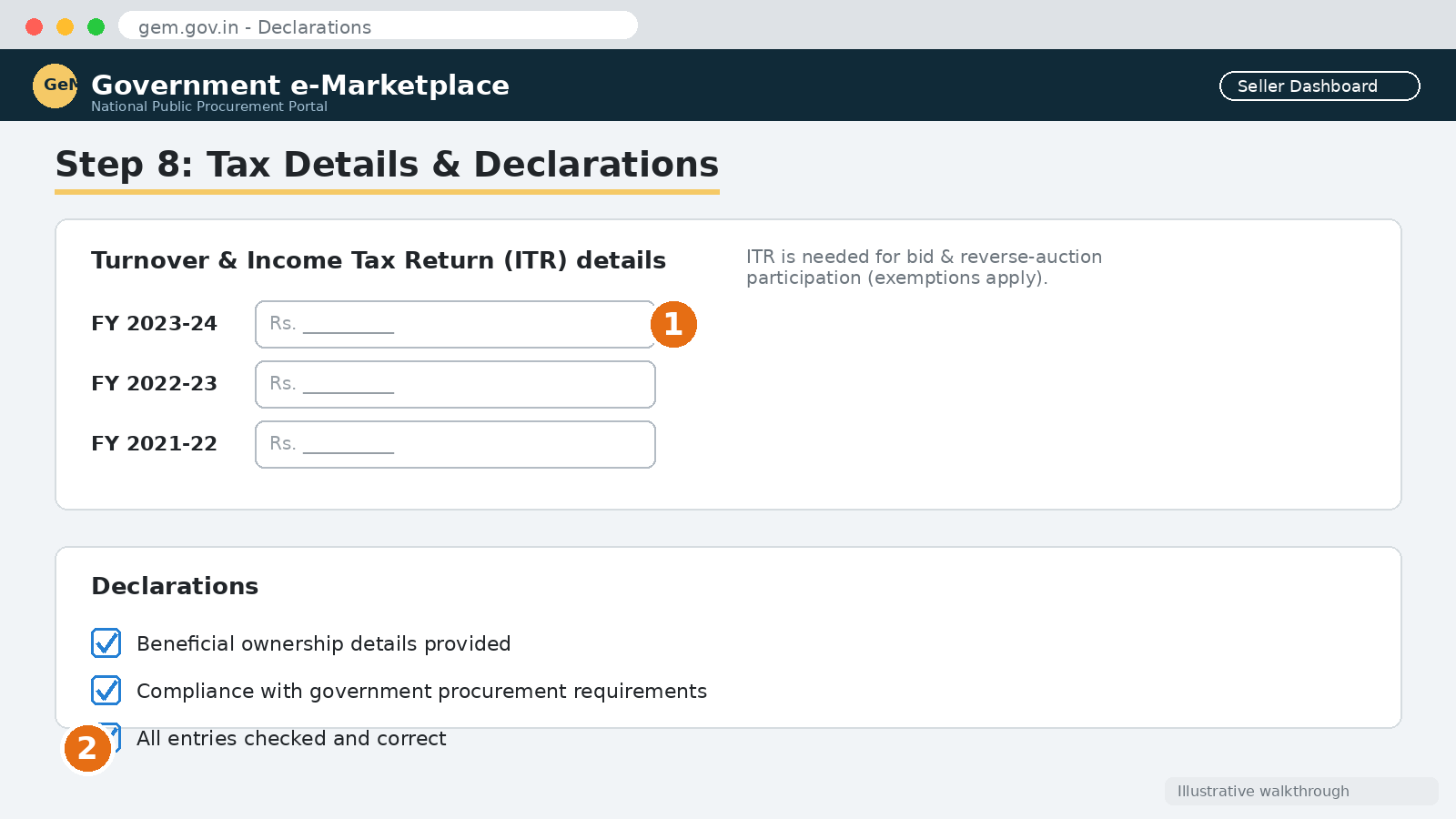
Provide the required turnover, tax, and ITR information. Complete declarations relating to applicable government procurement requirements, including beneficial ownership and other compliance details, wherever required.
Check all entries carefully before saving the profile.
Step 9: Complete Seller Profile and Add Products or Services
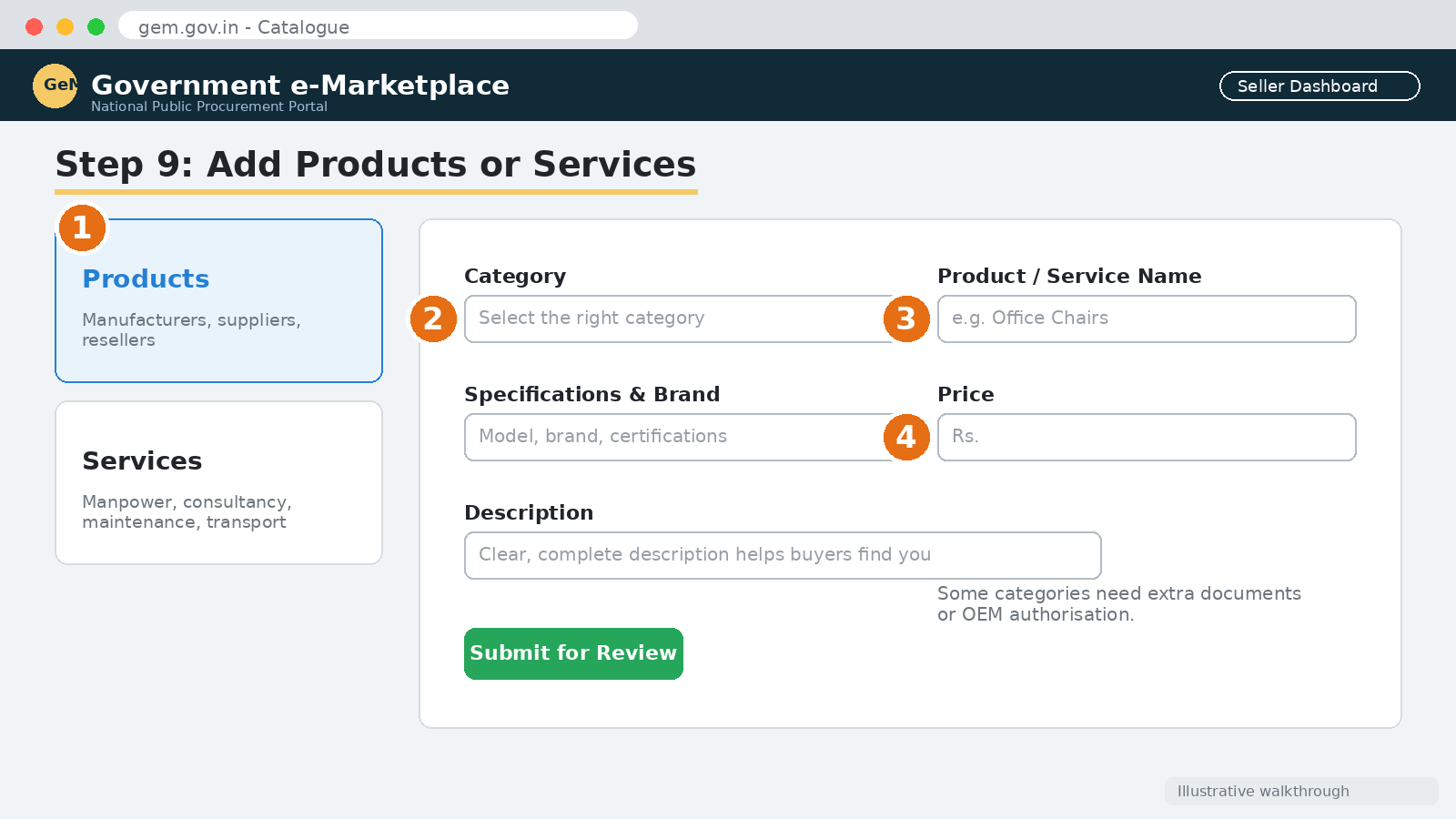
Once the organisation profile is completed, proceed to the Catalogue section.
Select the relevant option:
- Products: For manufacturers, suppliers, and authorised resellers.
- Services: For organisations providing services such as manpower, consultancy, maintenance, transportation, and other eligible services.
Enter the required descriptions, specifications, brand details, certifications, and pricing information.
Some product categories may require additional documents or OEM authorisation.
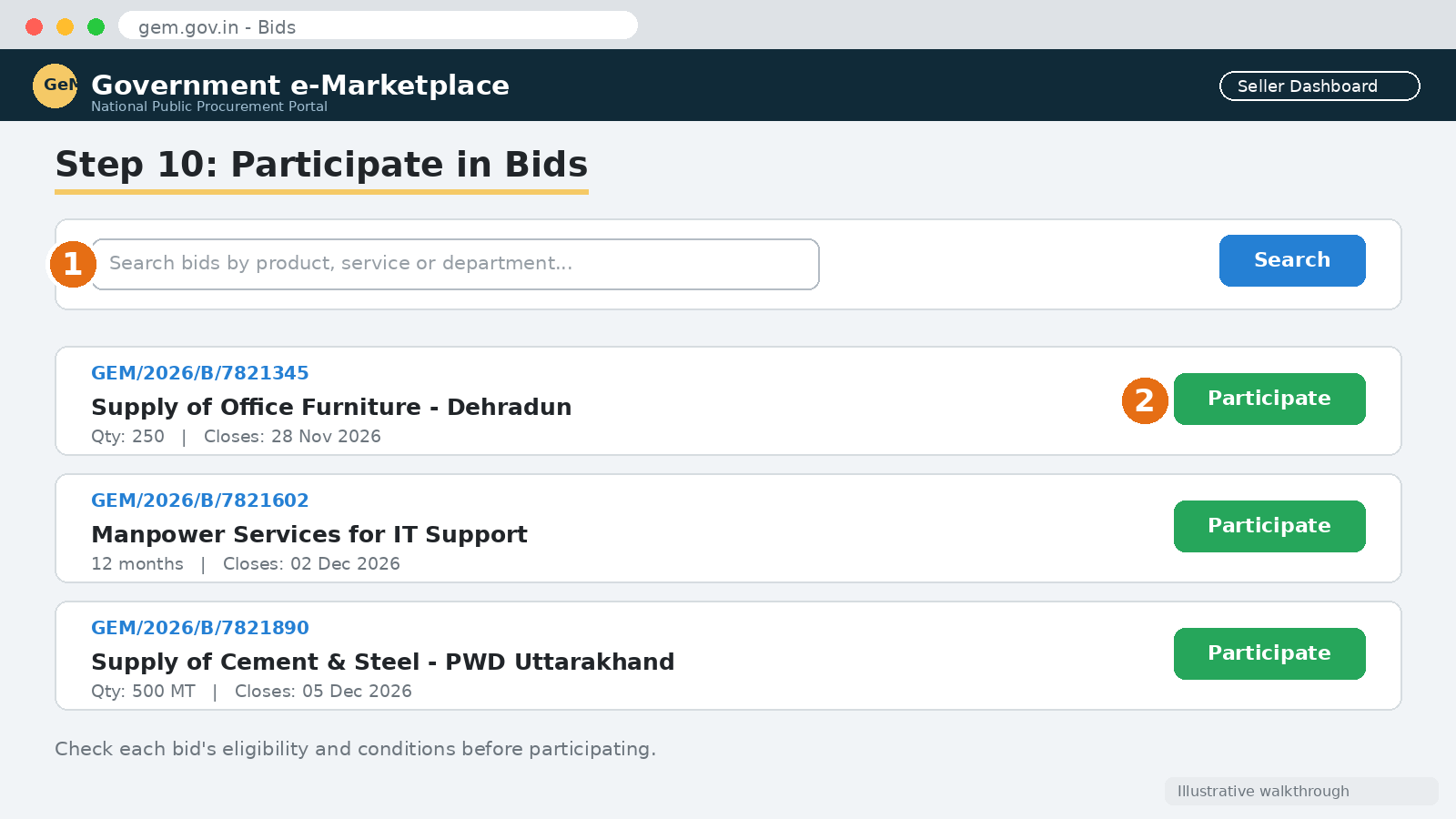
Step 10: Start Participating in Government Procurement
After completing the registration and relevant catalogue requirements, the seller or service provider can explore suitable procurement opportunities.
Navigate to the Bids section to search for tenders and participate according to the eligibility criteria and conditions specified in each bid.
Registration alone does not guarantee eligibility for every tender. The bidder must satisfy the specific technical, financial, and other qualification requirements.
5. Is GeM Registration Free?
Yes. Registration on the GeM Portal is free of charge. Sellers should not pay any unauthorised person or agency for basic registration.
However, separate charges or applicable transaction-related conditions, if any, should be checked in the current GeM terms and conditions.
6. Important Points to Remember
- Use the official website, https://gem.gov.in, for registration.
- Register using accurate business and personal details.
- Ensure that the authorised person completes identity verification.
- Keep PAN, GST, bank, and ITR information consistent with official records.
- Complete the organisation profile and relevant catalogue details.
- Check product-category requirements before listing products.
- Read the bid conditions carefully before participating in tenders.
- Never share your password or OTP with unauthorised persons.
Conclusion
GeM registration is an important first step for businesses seeking to participate in government procurement in India. The online process enables manufacturers, suppliers, contractors, and service providers to create an account, complete their organisation profile, and offer eligible products and services to government buyers.
By keeping the required documents ready and following the registration steps carefully, businesses can complete their GeM onboarding and explore government procurement opportunities through the platform.
Rajesh Pant is a Civil Engineer and Infrastructure Management professional with approximately 25 years of experience in the planning, implementation, coordination, management and execution of large-scale government infrastructure projects. His professional experience encompasses project management, procurement, contract administration, construction management and quality control of infrastructure projects. He also possesses nearly eight years of experience in Externally Aided Projects (EAPs), particularly in project implementation, procurement and contract management of World Bank-funded projects. His professional exposure includes working with projects financed by multilateral development organisations, providing valuable insights into international procurement practices, project implementation frameworks and contract management requirements. He holds a Master of Technology (M.Tech.) in Civil Engineering and a Master of Business Administration (MBA) in Infrastructure Management, combining technical engineering expertise with management and administrative capabilities. With extensive experience in public infrastructure development and government project management, Rajesh brings a practical, multidisciplinary perspective to the fields of contract management, procurement, project management and construction management.